Acknowledgment: Thank you @whoamix302 for sharing the sample!
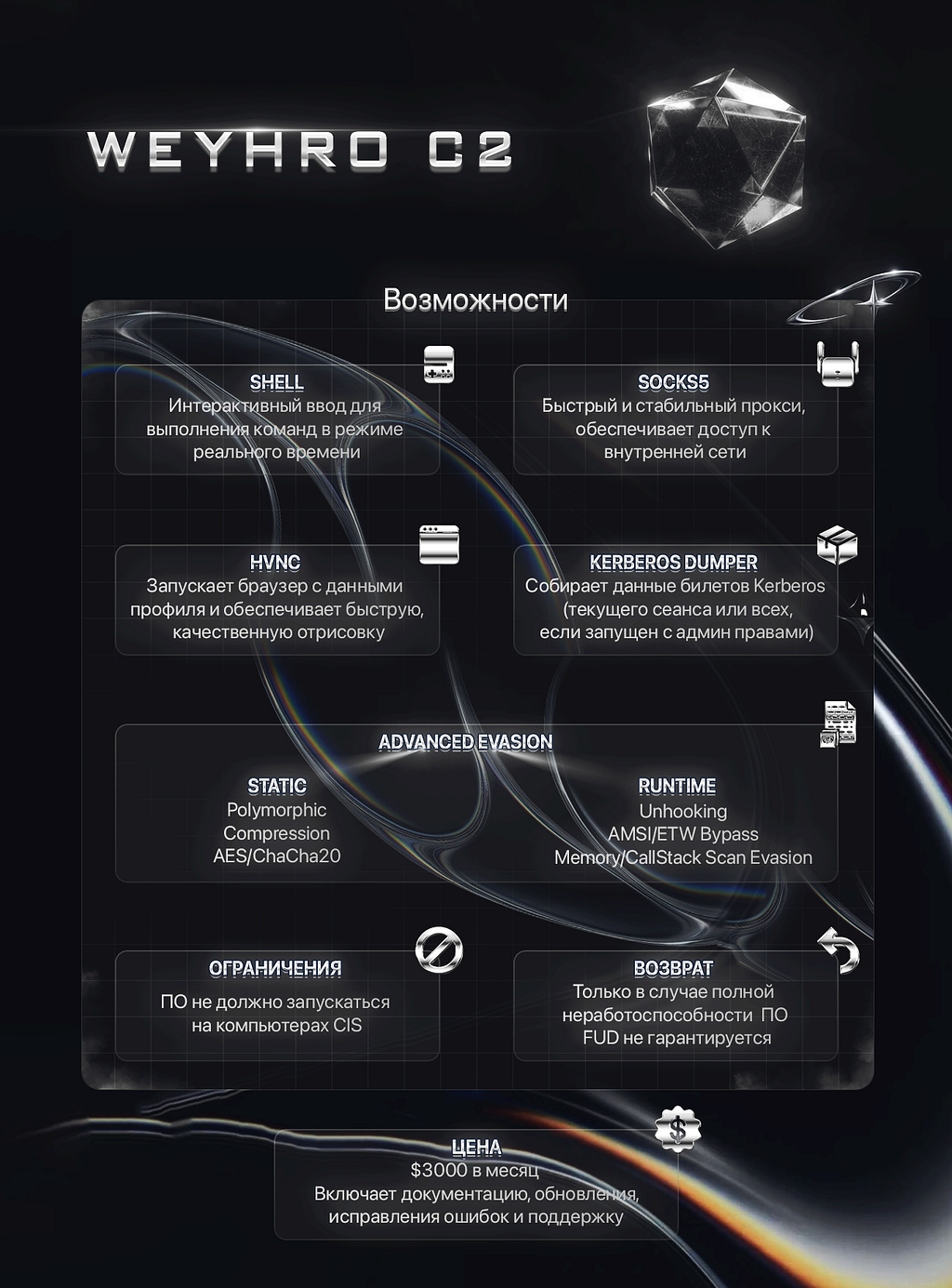
On December 3rd, 2025, someone using the handle Weyhro posted an advertisement on a cybercrime forum for a product called Weyhro C2. The product is marketed as an “advanced pentesting toolkit designed for stealth and defense evasion”, equipped with a full C2 infrastructure. According to the advertisement, the agent is designed to evade detection and bypass modern AV/EDR solutions on corporate networks, enabling capabilities across the entire spectrum of operations, from initial access and persistence to lateral movement and target engagement.
The advertisement highlights a modular architecture with the following core features:
- Shell —Reverse shell with panel control
- SOCKS5 —Fast proxy for proxychains or residential proxy use
- HVNC — Hidden VNC with browser session capture (cookies, passwords, tabs)
- Kerberos Dumper — Ticket extraction from current/all sessions (LSASS dump coming soon)
- Advanced Evasion — Polymorphic code, AES encryption, hook removal, AMSI/ETW patching, memory scan bypass
- Files — File manager with upload/download capability
The seller claims the agent runs as shellcode entirely from memory, is “completely encrypted”, and launched via a loader. The license is priced at $3,000/month with support, updates, and fixes included. Payment is accepted in BTC or USDT, with a restriction that the software must not run on CIS (Commonwealth of Independent States) systems.
Digging a bit further into the threat actor posting this tool — it appears they may be behind the Weyhro ransomware group. The Weyhro ransomware group reportedly became active sometime around March 2025. The timing of account creation preceding ransomware activity, and now the release of a full C2 toolkit suggests this is the same threat actor expanding their operations from ransomware to selling offensive tooling to other criminals.

So, What is Weyhro C2?
ChaCha20 String Decryption
The payload stores the encrypted strings in a global table. Each string is identified by a 32-bit String ID (NOT a hash of the plaintext) and decrypted using ChaCha20.
| Offset | Size | Field |
|---|---|---|
| +0x00 | 8 bytes | Pointer to encrypted string data |
| +0x08 | 8 bytes | Encrypted string length |
| +0x10 | 32 bytes | ChaCha20 Key (unique per entry) |
| +0x30 | 8 bytes | Decrypted string length |
| +0x38 | 4 bytes | String ID (lookup key) |
| +0x3C | 12 bytes | ChaCha20 Nonce (unique per entry) |
Each entry contains everything needed to decrypt its strings: a pointer to the encrypted data, the cryptographic key, and nonce.
The decryption steps:
- Iterate through the string table comparing each entry’s String ID with the requested ID
- Retrieve encrypted data pointer, ChaCha20 key (32 bytes), and nonce (12 bytes)
- Initialize state with “expand 32-byte k” constant, perform 20 rounds, XOR keystream with ciphertext
Example:
// Decrypt "ntdll.dll" using String ID 0xA0BBDDB3
char buffer[64] = {0};
mw_ChaCha20Decrypt(0xA0BBDDB3, buffer, sizeof(buffer));
// buffer now contains "ntdll.dll"
Key String IDs identified:
ID=0x6776C0F8: kernel32.dll
ID=0xA0BBDDB3: ntdll.dll
ID=0x565E35E0: user32.dll
ID=0x9F894C6C: advapi32.dll
ID=0x15971A3E: secur32.dll
ID=0xBFBDAB86: ws2_32.dll
ID=0xFA852BBF: CreateFileA
ID=0xFCF366AF: GetFileSize
ID=0x85AB24C4: ReadFile
ID=0x45AD6CF1: CloseHandle
ID=0xC9834F5F: OpenProcessToken
ID=0x54B5F192: GetCurrentProcess
ID=0xFA16AE04: GetTokenInformation
ID=0x054921F3: VirtualAlloc
ID=0xE038FF15: VirtualAllocEx
ID=0xD85B1113: VirtualProtectEx
ID=0x27895BAD: CreateProcessW
ID=0x585AEBC5: GetCurrentProcessId
ID=0xFB274884: GetProcessHeap
ID=0x8D095AC3: HeapAlloc
ID=0xF4CFA78F: HeapFree
ID=0xA4CA99F4: LsaConnectUntrusted
ID=0x58F05DB2: LsaRegisterLogonProcess
ID=0x87BF6929: LsaLookupAuthenticationPackage
ID=0xAF3758EF: LsaEnumerateLogonSessions
ID=0x80DF6DD3: LsaGetLogonSessionData
ID=0x9DD10C70: LsaCallAuthenticationPackage
ID=0x7EAEB305: LsaFreeReturnBuffer
ID=0x5D286218: DuplicateTokenEx
ID=0x7D011A19: ImpersonateLoggedOnUser
ID=0xA2C5320B: RevertToSelf
ID=0x14C545C7: NtAllocateVirtualMemory
ID=0x8DB2F7D3: NtProtectVirtualMemory
ID=0xA38A84FE: NtClose
ID=0x8F4D8C6A: FindWindowW
ID=0x698F3F83: LoadLibraryA
ID=0x74028CBA: WriteConsoleA
ID=0x5904F8CA: GetModuleFileNameW
ID=0x83572B88: GetStdHandle
ID=0x3CC19F79: WSAStartup
ID=0xFFFC1AD2: WSACleanup
ID=0x5A91A8F5: WSASocketW
ID=0xD091D3D9: connect
ID=0x1D294A01: send
ID=0x23BC9501: recv
ID=0x0CE82532: closesocket
ID=0xAEA8C55D: CreatePipe
ID=0x3905EABB: DuplicateHandle
ID=0xA3309BD0: WaitForSingleObject
ID=0xBA557E2E: NtWriteVirtualMemory
ID=0x2B9B05BA: NtReadVirtualMemory
ID=0xDA72FBB8: NtQueryInformationProcess
ID=0x44DFA62D: NtOpenProcess
ID=0x418178B0: NtCreateThreadEx
ID=0xB209EA4C: NtSuspendThread
ID=0x5D5A3E1C: NtResumeThread
ID=0x3B54C106: NtFreeVirtualMemory
ID=0x194DBA69: NtMapViewOfSection
ID=0x2C19C7AB: NtUnmapViewOfSection
ID=0x639D9E97: NtReadFile
ID=0xD8472464: EtwEventWrite
ID=0x39AB148E: AmsiScanBuffer
ID=0x0D5406A3: kernelbase.dll
ID=0xDE895451: amsi.dll
ID=0x749AA3C2: C:\Windows\System32\ntdll.dll
ID=0xCC2CE509: LdrGetDllHandle
ID=0xBE78AB40: WriteProcessMemory
ID=0x39B5C443: ResumeThread
ID=0x57CE9C93: GetThreadContext
ID=0x78E12844: SetThreadContext
ID=0xD9F6AD83: IsDebuggerPresent
ID=0x12BF02D5: CreateToolhelp32Snapshot
ID=0x1B105040: Process32FirstW
ID=0xD08B9B65: Process32NextW
ID=0x70DD9366: OpenThreadToken
ID=0x42657133: GetCurrentThread
ID=0xE1518A7F: GlobalMemoryStatusEx
ID=0x8F063A3A: NetGetJoinInformation
ID=0x4DF495A7: RegOpenKeyExW
ID=0xF5944F88: RegCloseKey
ID=0xD5B50261: VirtualProtect
ID=0x54ABC644: RegOpenKeyExA
ID=0x35BC2C28: RegQueryValueExW
ID=0xA1FBF2A4: NtOpenKey
ID=0xD6145070: NtCreateKey
ID=0xD58E9518: GetProcessId
ID=0x5B1ED11D: EnumWindows
ID=0xDB83907E: GetWindowThreadProcessId
ID=0x1B8BE250: DestroyWindow
ID=0x71F73233: CreateRemoteThread
ID=0xC79ABA16: CreateThread
ID=0x174BFE01: WriteFile
ID=0xBDC11BED: Sleep
ID=0x8307F657: PeekNamedPipe
ID=0x7FDFDB0C: FlushFileBuffers
ID=0x7E1DCA0E: socket
ID=0x5E667354: ioctlsocket
ID=0xEACD5301: select
ID=0x9E80EE1E: WSAGetLastError
ID=0xD78C25D8: NtCreateNamedPipeFile
ID=0x15E8CE02: NtWriteFile
ID=0xE6D03D06: GetUserNameA
ID=0x3A03B251: GetComputerNameA
ID=0xD9AB418F: RtlGetVersion
ID=0x145FDA43: getsockname
ID=0x447929D9: bind
ID=0xC6B770FF: listen
ID=0x492D1331: accept
ID=0x399B44D1: setsockopt
ID=0xE5E579D9: getsockopt
ID=0x1440A192: gethostbyname
ID=0x35648B37: gdi32.dll
ID=0xFB4A7F05: InitializeSecurityDescriptor
ID=0xC493F8F2: SetSecurityDescriptorDacl
ID=0xDCF393E2: CreateDesktopA
ID=0xCB4ACFAD: SetThreadDesktop
ID=0xA5911DE8: CloseDesktop
ID=0x1C8C3300: GetGUIThreadInfo
ID=0x9AAF4453: GetThreadDesktop
ID=0xC0FBA7DD: GetWindowRect
ID=0xDAC57377: ScreenToClient
ID=0x186E188A: GetClientRect
ID=0xD39F1F69: FindFirstFileW
ID=0x438B6025: FindNextFileW
ID=0x48E9CC8D: FindClose
ID=0xB5EDF6AE: CreateFileW
ID=0x5411E5CA: DeleteFileW
ID=0x18B521D1: CreateDirectoryW
ID=0xD9DFEC46: MoveFileW
ID=0x99E2E690: CopyFileW
ID=0xAC23A6F8: GetFileAttributesW
ID=0x4A545BAB: GetFileTime
ID=0xB51B3B0F: FileTimeToSystemTime
ID=0xF1682DA2: SystemTimeToFileTime
ID=0x369B65D6: SetFilePointer
ID=0x321189A8: cmd.exe
ID=0xF5822B0C: PostMessageA
ID=0x760E88E4: GetCurrentThreadId
ID=0xAFD4DAC7: CreateProcessA
ID=0xC6C22D53: GetLastError
ID=0x458B2170: OpenProcess
ID=0x9683953F: TerminateProcess
ID=0x3C9D8FA6: Thread32First
ID=0x594F8166: Thread32Next
ID=0x91CBB3F2: Process32First
ID=0xFBB9F934: Process32Next
ID=0xDDA147F6: FreeConsole
ID=0x6B3C4E81: GetDC
ID=0x99C99F83: ReleaseDC
ID=0x4263A3C3: CreateCompatibleDC
ID=0x51D2202F: DeleteDC
ID=0x3A90E064: CreateCompatibleBitmap
ID=0x290B3CAA: DeleteObject
ID=0x7A1123AE: SelectObject
ID=0x62034019: BitBlt
ID=0x71093716: GetDIBits
ID=0xBB8517F5: GetWindowDC
ID=0x4A8FF765: NetApiBufferFree
ID=0xDB6F3320: NetWkstaGetInfo
ID=0xCD94BB1E: Netapi32.dll
ID=0x561C5F24: NtQueryInformationToken
ID=0x4C8C2C4D: NtQuerySystemInformation
ID=0x42755D7B: GetModuleHandleW
ID=0x4D3B07B9: GetProcAddress
ID=0x94ECA6C7: RtlCreateHeap
ID=0xF342DE1E: RtlDestroyHeap
ID=0x4941F646: RtlAllocateHeap
ID=0x647015F6: RtlFreeHeap
ID=0x2E3C4C11: RtlReAllocateHeap
ID=0x1E4A758F: CreateFileMappingW
ID=0x1BC2EC6C: MapViewOfFile
ID=0xCD67729E: NtSetValueKey
ID=0x60C24771: shell32.dll
ID=0x6FDC6558: SHGetFolderPathW
ID=0x33F7E0C1: NtWaitForSingleObject
ID=0xB3160562: Microsoft\Windows\Security
ID=0x187C5415: msdefcore.exe
ID=0xCACF8C87: WMIProviderHost
ID=0x6E0419B9: Software\Microsoft\Windows\CurrentVersion\Run
ID=0xCE93839B: ReadProcessMemory
ID=0x722285DC: C:\Windows\System32\cmd.exe
ID=0xD5D51295: LsaDeregisterLogonProcess
EDR/AV Unhooking Mechanism
The snippet below implements an anti-EDR technique: loading a copy of ntdll.dll directly from disk to obtain unhooked function bytes. EDR and AVs typically hook ntdll.dll functions in memory by inserting JMP instructions at function prologues, but they cannot modify the file stored on disk. By reading the original file, the payload obtains clean, unmodified function bytes that can later be used to overwrite the hooked versions in memory.
The code first decrypts the target file path using ChaCha20 encryption. The String ID 0x749AA3C2 (shown as decimal 1956291522 in the decompiled code) serves as a lookup key into the encrypted string table, which decrypts to the full path C:\Windows\System32\ntdll.dll.
Before performing any file operations, the payload must resolve the required Windows API functions — CreateFileW, GetFileSize, VirtualAlloc, ReadFile, and CloseHandle. All five APIs reside in kernel32.dll, identified by String ID 0x6776C0F8. Each API name is itself stored as a ChaCha20-encrypted string with its own String ID: 0xFA852BBF for CreateFileW, 0xFCF366AF for GetFileSize, 0x85AB24C4 for VirtualAlloc, 0x45AD6CF1 for ReadFile, and 0x054921F3 for CloseHandle (refer to the table of string IDs above).
| With the API pointers resolved, the payload opens ntdll.dll from disk with CreateFileW with GENERIC_READ access and FILE_SHARE_READ sharing mode. The OPEN_EXISTING flag ensures the call fails if the file doesn’t exist. After obtaining a valid file handle, it queries the file size using GetFileSize, then allocates a memory buffer of exactly that size using VirtualAlloc. The allocation uses MEM_COMMIT | MEM_RESERVE (0x3000) with PAGE_EXECUTE_READWRITE (0x40) protection, giving the buffer read, write, and execute permissions. |
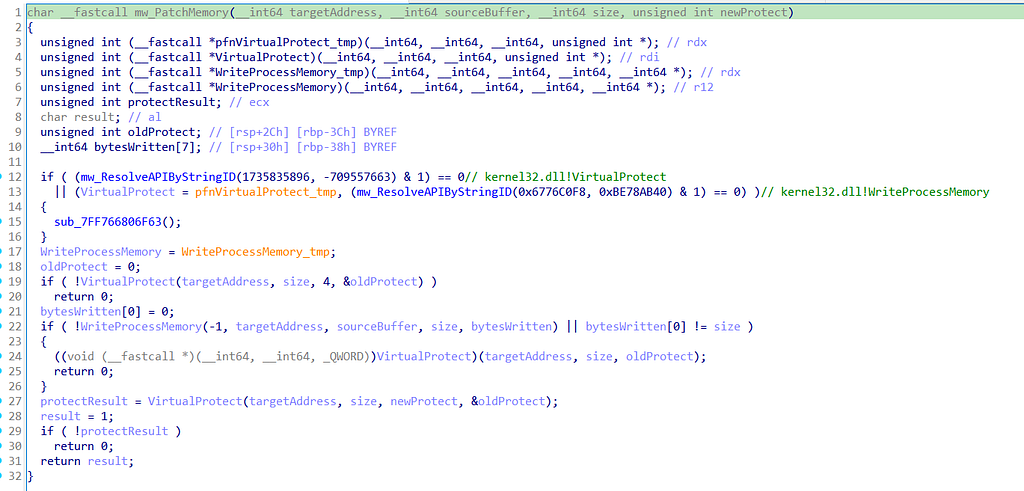
The payload then reads the entire ntdll.dll file into the allocated buffer, passing the file handle, buffer pointer, and expected size. After the read completes, it immediately closes the file handle and verifies that the number of bytes actually read matches the expected file size. If this validation succeeds, the buffer now contains an exact byte-for-byte copy of the clean, unhooked ntdll.dll from disk. This clean copy acts as a reference for the following unhooking operation. The payload parses the PE structure of the clean disk copy, locates the .text section by searching for the magic bytes 0x747865742E (“.text”), and then overwrites the entire hooked .text section in memory with the clean bytes from disk with the patch memory function below. This effectively removes any EDR inline hooks by restoring the original function prologues.
ETW and AMSI Patching
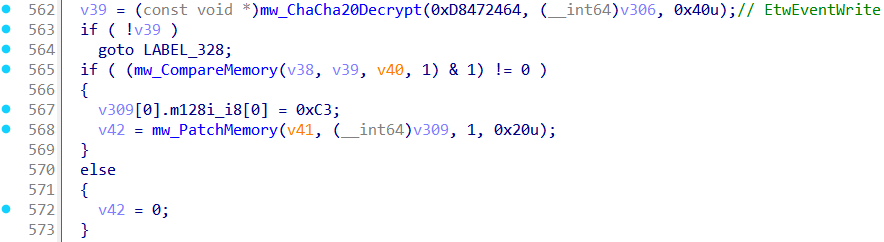
The ETW patch is simple: it finds EtwEventWrite (or similar ETW function) in ntdll.dll and overwrites the first byte with 0xC3 (RET). This makes the function return immediately without doing anything, effectively disabling Event Tracing for Windows telemetry.
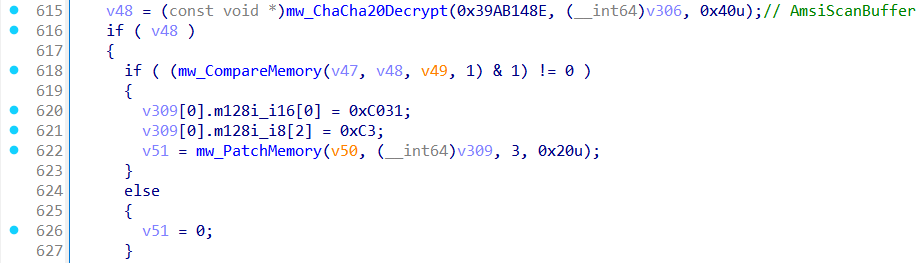
The payload bypasses AMSI by patching the AmsiScanBuffer function directly in memory. If amsi.dll is not loaded in the process, the patch is skipped and the payload logs [~] AMSI patch skipped: amsi.dll not loaded.
If amsi.dll is present, the payload locates the function AmsiScanBuffer. Once found, it overwrites the first three bytes of the function with 31 C0 C3. The bytes 31 C0 disassemble to XOR EAX, EAX which sets the return value to zero, and C3 is the RET instruction which returns immediately to the caller. Since AMSI uses the return value to determine scan results, returning zero indicates AMSI_RESULT_CLEAN, meaning the scanned content is safe.
Persistence
The payload establishes persistence by copying itself to %APPDATA%\Microsoft\Windows\Security\msdefcore.exe. It first calls SHGetFolderPathW with CSIDL_APPDATA (26) to get the user’s AppData\Roaming folder, then appends the path Microsoft\Windows\Security\msdefcore.exe. Before copying, it checks if a file already exists at that location using GetFileAttributesW, and if so, deletes it with for a clean installation. It then copies the currently running executable to the destination.
After placing the file, the payload writes a registry value to ensure it runs on every user login. It opens HKEY_CURRENT_USER with RegOpenKeyExA, then uses NtCreateKey to create or open the subkey Software\Microsoft\Windows\CurrentVersion\Run. Finally, it calls NtSetValueKey to write a value named WMIProviderHost pointing to the dropped executable.
Process Injection
The payload uses a process hollowing technique to inject its payload into a legitimate Windows process. It decrypts the target process path C:\Windows\System32\cmd.exe using ChaCha20, then resolves the necessary APIs including CreateProcessA, VirtualAllocEx, WriteProcessMemory, VirtualProtectEx, and ResumeThread. It spawns cmd.exe in a suspended state using the CREATE_SUSPENDED flag (0x4), which prevents the process from executing until explicitly resumed.
Once the suspended process is created, the payload allocates executable memory in the target process using VirtualAllocEx , then writes the decrypted payload using WriteProcessMemory. It queries the process information via NtQueryInformationProcess to locate the PEB, validates the payload’s PE headers, and determines whether the payload is x86 (0x14C) or x64 (0x8664). The payload then constructs a small shellcode stub and calls ResumeThread.
For x64:
mov rax, 0x    ; Load payload address into RAX (0xB848 + 8 bytes addr)
jmp rax                          ; Jump to payload (0xFFE0)
For x86:
mov eax, 0x    ; Load payload address into EAX (0xB8 + 4 bytes addr)
jmp eax                          ; Jump to payload (0xFFE0)
HVNC?
As described in the forum post, the payload includes Hidden Virtual Network Computing (HVNC). Unlike traditional VNC which mirrors the victim’s visible screen, HVNC creates an invisible desktop session that runs completely hidden from the user. The payload accomplishes this by calling CreateDesktopA to spawn a new desktop object that exists in a separate session from the user’s active desktop, then uses SetThreadDesktop to switch its threads to this hidden workspace. Any applications launched on this invisible desktop will execute without any visual indication to the victim.
The screen capture and streaming functionality is supported by a full suite of GDI (Graphics Device Interface) APIs present in the encrypted string table: GetDC/GetWindowDC to obtain device contexts, CreateCompatibleDC and CreateCompatibleBitmap to set up off-screen buffers, BitBlt to perform fast screen captures, and GetDIBits to extract the raw pixel data for transmission to the C2 server. Supporting functions like SelectObject, DeleteObject, DeleteDC, and ReleaseDC handle proper resource management. The GetWindowRect and GetGUIThreadInfo APIs allow the threat actor to enumerate and interact with windows on the hidden desktop. While the actual HVNC implementation code was not found in this payload, the presence of these 16+ HVNC-specific API entries in the encrypted string table confirms this payload has full hidden desktop and screen capture capabilities ready for deployment.
Kerberos Dumper?
As described in the forum post, the payload includes Kerberos ticket dumping capability. The encrypted string table contains the complete API infrastructure required for extracting Kerberos tickets from the Local Security Authority (LSA):
- LsaCallAuthenticationPackage - Sends ticket retrieval requests to the Kerberos SSP
- LsaLookupAuthenticationPackage - Locates the Kerberos authentication package
- LsaConnectUntrusted / LsaFreeReturnBuffer - Establishes connections to LSA and manages memory
- NtQueryInformationToken - Retrieves token details including logon session info
- NtQuerySystemInformation - Enumerates system-wide logon sessions
- OpenProcessToken - Opens process tokens for inspection
- ImpersonateLoggedOnUser - Impersonates user contexts to access their tickets
The Kerberos dumping workflow typically involves: connecting to LSA via LsaConnectUntrusted, looking up the Kerberos package with LsaLookupAuthenticationPackage, then calling LsaCallAuthenticationPackage with KerbRetrieveEncodedTicketMessage to extract TGTs and service tickets from the current session or all sessions when running with elevated privileges. The presence of NtQuerySystemInformation suggests capability to enumerate all logon sessions system-wide.
While the actual Kerberos dumping implementation code was not found in this binary, the presence of 40+ credential/token-related API entriesin the encrypted string table confirms this payload has the capabilities for full Kerberos ticket extraction.
Secondary Payload Decryption
The payload uses a custom AES-128-CTR implementation to decrypt its secondary payload, followed by LZSS decompression to extract the secondary payload.
Custom AES Implementation
The payload implements its own AES-128 encryption, computing the S-Box at runtime using the standard GF(2⁸) multiplicative inverse algorithm. This runtime generation avoids embedding the recognizable 256-byte AES S-Box table in the binary.
The key expansion follows the standard AES schedule but uses the custom S-Box for the SubWord operation. The encryption operates in CTR (Counter) mode with an 8-byte IV and an 8-byte counter.
The AES key (9B E2 55 CF 18 D8 D1 13 51 42 8B 32 11 A9 E8 02)and IV (74 DC 9A EE 3E D9 94 17)are hardcoded in the binary.
LZSS Decompression
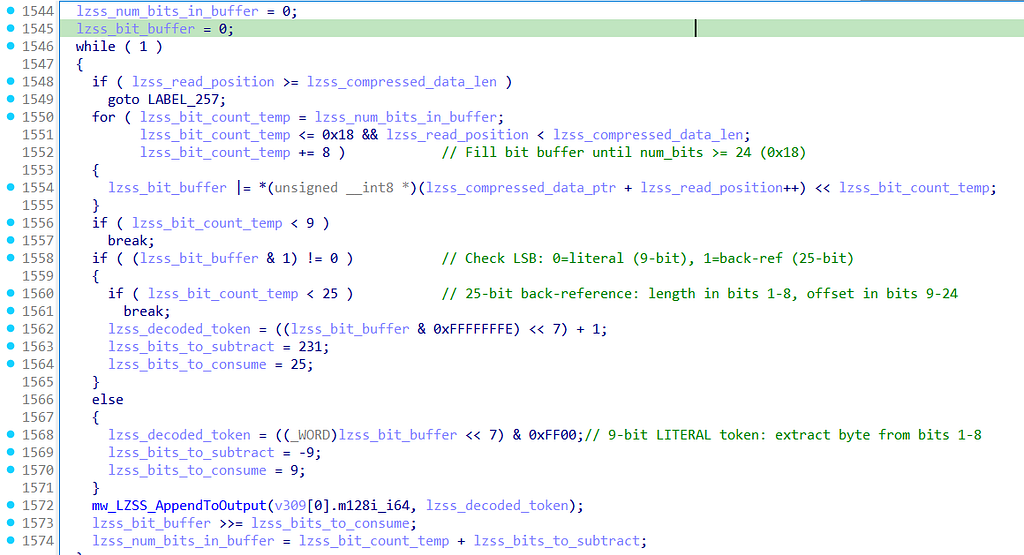
After decryption, the output is a LZSS-compressed data that must be decompressed to recover the secondary payload. The implementation uses a bit-stream encoding:
- Literal token (9 bits): LSB is 0, followed by 8-bit literal byte value
- Back-reference token (25 bits): LSB is 1, followed by 8-bit length and 16-bit offset
Loader
The payload contains the loader export function, which is a reflective PE loader that is used to dynamically load the agent directly into memory without ever touching disk.
The loader begins by resolving Windows APIs through DJB2 hash lookups rather than standard imports. It resolves functions like LoadLibraryA, GetProcAddress, VirtualAlloc, VirtualProtect, and FlushInstructionCache by walking the Process Environment Block (PEB) and matching hash values against export names.
As mentioned above, beyond the ChaCha20-encrypted string table, the payload uses an API resolution mechanism using the DJB2 hashing algorithm. This is a classic hash function, starting with the magic value 5381 and using a multiplier of 33. The implementation includes case-insensitive matching by converting lowercase characters to uppercase before hashing.
hash = 5381
for each character c in string:
    if c >= 'a':
        c = c - 32  // Convert to uppercase
    hash = hash * 33 + c
Resolved hashes:
0xB7072FDB: LoadLibraryA
0xDECFC1BF: GetProcAddress
0x097BC257: VirtualAlloc
0xE857500D: VirtualProtect
0xEFB7BF9D: FlushInstructionCache
0xE144A60E: VirtualFree
0xC165D757: ExitThread
| Once APIs are resolved, the loader parses the incoming PE file’s headers, starting with the DOS header’s e_lfanew field to locate the NT headers. It then allocates memory at the PE’s preferred ImageBase using VirtualAlloc with MEM_COMMIT | MEM_RESERVE flags. If the preferred address is unavailable, it falls back to allocating at any available location. The loader proceeds to map each section from the raw PE data to its corresponding virtual address, copying .text, .data, .rdata, and other sections to their proper offsets within the allocated memory region. |
After imports are resolved, the loader applies appropriate memory protections to each section based on their characteristics flags, converting PE section attributes to Windows memory protection constants like PAGE_EXECUTE_READ, PAGE_READONLY, and PAGE_READWRITE. A call to FlushInstructionCache helps the CPU to recognize the newly written executable code. Finally, the loader transfers control to the agent by calling its entry point with DLL_PROCESS_ATTACH.
The Agent
The agent has the same functionality as in the initial payload to decrypt strings via ChaCha20 and resolve Windows APIs dynamically using encrypted string IDs. The following string IDs were identified during the decryption:
0xA00163E1: kernel32.dll
0x4FBEACC0: ntdll.dll
0xE89D8CFB: user32.dll
0xA508724D: advapi32.dll
0x1B5C2B09: ws2_32.dll
0x32B6440D: CreateFileA
0xE006D837: GetFileSize
0x5A14D573: ReadFile
0xDF166002: CloseHandle
0xE40747F3: VirtualAlloc
0x7DB3FC25: VirtualAllocEx
0x64E8E531: VirtualProtectEx
0x3B4A43E0: CreateProcessW
0x07482DF7: GetCurrentProcessId
0xED8676E3: NtAllocateVirtualMemory
0x87EDC5DC: NtProtectVirtualMemory
0xC7A11913: NtClose
0xBED3FAED: FindWindowW
0xA53B62D4: LoadLibraryA
0xDEF5536C: WriteConsoleA
0x95FB4873: GetModuleFileNameW
0x65E1B0D8: GetStdHandle
0x6C2A34B2: WSAStartup
0x3154B1B0: WSACleanup
0xD510A9EE: WSASocketW
0x929CF63A: connect
0x70322EE5: send
0x4E2921A8: recv
0x2916ABC5: closesocket
0x488BB71C: CreatePipe
0x5E256D58: DuplicateHandle
0x252C7570: CreateRemoteThread
0x1745E5BE: Sleep
0xD6A0D3D0: PeekNamedPipe
0x791C1B7C: OpenProcessToken
0xA8EF236F: GetUserNameA
0x19E1BAE1: Software\\Microsoft\\Windows\\CurrentVersion\\Run
0x093BFC4D: cmd.exe
Commands:
file - File operations (list/read/write/delete)
injt - Process injection via CreateRemoteThread
sock - SOCKS5 proxy
shll - Reverse shell
ping - Heartbeat (responds "pong")
proc - Process/network enumeration
File Operations
The file operations module supports multiple sub-commands for interacting with the victim’s file system. Based on the error strings embedded in the binary, the supported operations include directory enumeration via FindFirstFile/FindNextFile, file reading with configurable position seeking, file writing for data exfiltration staging or payload dropping, and file deletion.
- "Failed to find first file" - Directory listing (FindFirstFileW)
- "Failed to set file position" - File seeking (SetFilePointer)
- "Failed to read file" - File reading (ReadFile)
- "Failed to open file" - File access (CreateFileW)
- "Failed to write file" - File writing (WriteFile)
- "Failed to delete file" - File deletion (DeleteFileW)
The handler parses sub-command parameters from the C2 packet payload, extracting the operation type, target path, and any additional parameters such as file offsets or data buffers. All file paths are processed through GetFullPathNameA.
Process Injection Command (injt)
The injection handler implements classic CreateRemoteThread-based process injection, a technique commonly used by payload for code execution in the context of a legitimate process.
The handler parses a structured packet from the C2 server with a specific format: after skipping the 4-byte command identifier (“injt”), the code reads the target process ID as a DWORD at offset +0, the shellcode length as a DWORD at offset +4, and the raw shellcode bytes starting at offset +8.
| Offset | Field |
|---|---|
| Bytes 0-3 | injt (command identifier) |
| Bytes 4-7 | Target PID (DWORD, little-endian) |
| Bytes 8-11 | Shellcode length (DWORD) |
| Bytes 12+ | Shellcode data (variable length) |
The handler validates the packet size before processing: it first checks that at least 8 bytes exist beyond the command (minimum header), then verifies the total packet size accommodates the declared shellcode length.
0x18000D22B: mov edx, 0xAA953F88 ; GetProcAddress/GetModuleHandle
0x18000D245: mov edx, 0x7DB3FC25 ; VirtualAllocEx
0x18000D25F: mov edx, 0x89F3E8B9 ; WriteProcessMemory
0x18000D27B: mov edx, 0x64E8E531 ; VirtualProtectEx
0x18000D295: mov edx, 0x252C7570 ; CreateRemoteThread
0x18000D2B6: mov edx, 0xDF166002 ; CloseHandle
| The injection sequence is as follows: The handler first calls OpenProcess with PROCESS_ALL_ACCESS (0x1F0FFF) to obtain a handle to the target process. Memory is then allocated in the target process via VirtualAllocEx with MEM_COMMIT | MEM_RESERVE (0x3000) flags. The retrieved payload is written using WriteProcessMemory, followed by a memory protection change via VirtualProtectEx to PAGE_EXECUTE_READWRITE (0x40). Finally, CreateRemoteThread executes the injected code, and the process handle is closed for cleanup. |
SOCKS5 Proxy Command (sock)
The sock command starts a SOCKS5 proxy on the victim, allowing the attacker to route traffic through the compromised machine to access internal resources behind the firewall or pivot to other systems on the network.
Upon receiving the sock command, the handler initializes a SOCKS5 server instance that listens for incoming proxy requests from the C2 infrastructure. The implementation follows the RFC 1928 SOCKS5 protocol specification, supporting the CONNECT command for TCP relay. Error handling strings socks5_invalid and [agent] Winsock FAIL indicate built-in validation and network error recovery.
Reverse Shell Command (shll)
The reverse shell handler gives an interactive command-line access to the compromised system.
The shell implementation creates a hidden cmd.exe process with redirected standard handles. The payload uses CreatePipe for setting up anonymous pipes, and CreateProcessW for spawning the command interpreter. The pipes redirect the shell’s stdin, stdout, and stderr, enabling bidirectional communication with the C2 server.
- CreatePipe() for stdin redirection
- CreatePipe() for stdout/stderr capture
- CreateProcessW("cmd.exe", ..., CREATE_NO_WINDOW)
- Continuous read/write loop with C2
Heartbeat Command (ping)
The ping handler implements a simple heartbeat mechanism for connection keepalive and implant health verification.
When the C2 server sends a ping command, the handler responds with a pong message. This is pretty common in malware (like RATs) to verify the implant is still alive and maintain an active connection with the C2 server.
Process Enumeration Command (proc)
The proc handler collects network and system information for reconnaissance. The handler resolves GetAdaptersInfo to enumerate network adapters and IP addresses.
C2 Communications Protocol
A notable weakness in this payload is its use of unencrypted plaintext for all command-and-control communications. Despite the ChaCha20 and AES encryptions used to obfuscate strings within the binary and decrypt the secondary paylaod, the actual network traffic between the implant and C2 server is transmitted in cleartext.
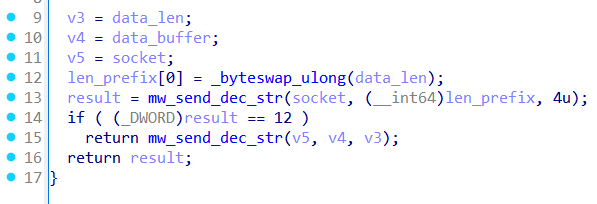
The protocol follows a simple length-prefixed format. The function blow prepares outbound data by converting the payload length to big-endian (network byte order), sends the 4-byte length prefix, then transmits the raw payload data via the Winsock send(). I am not seeing any encryption occurring at any point in this chain.
Weyhro C2 Panel
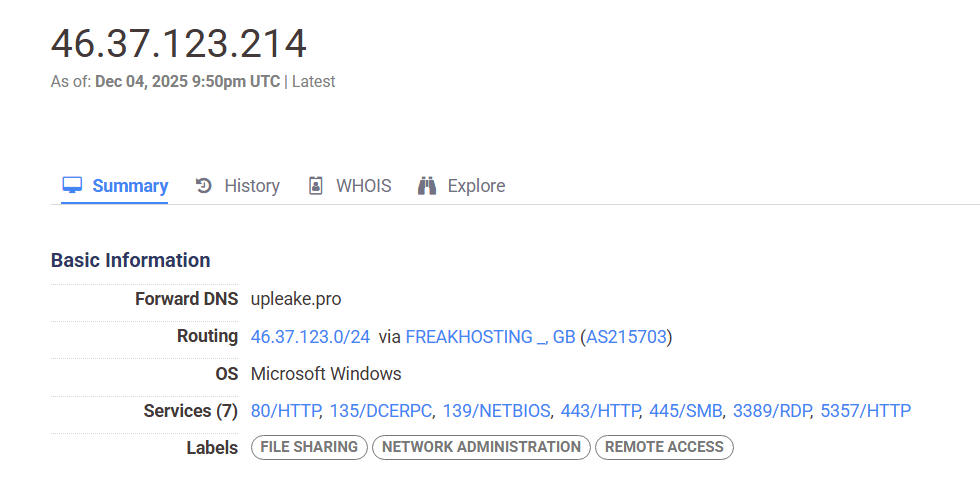
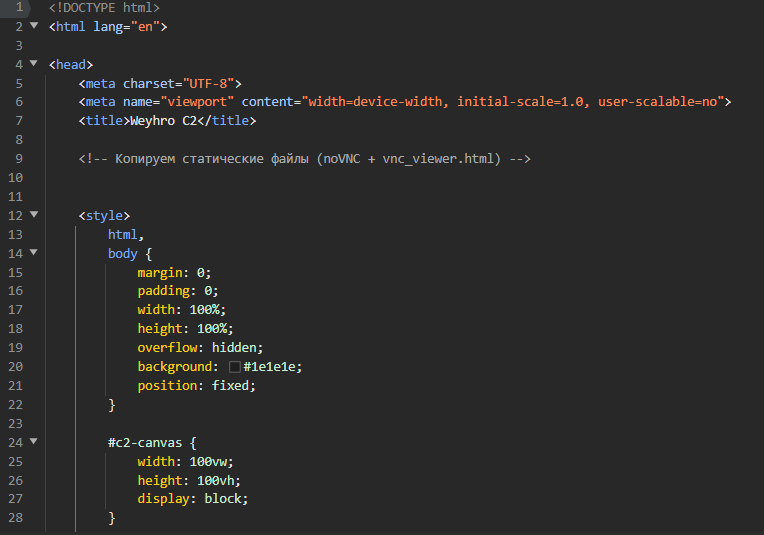
Pivoting to the C2 address using one of my favorite tools — Censys, we can find the panel easily.
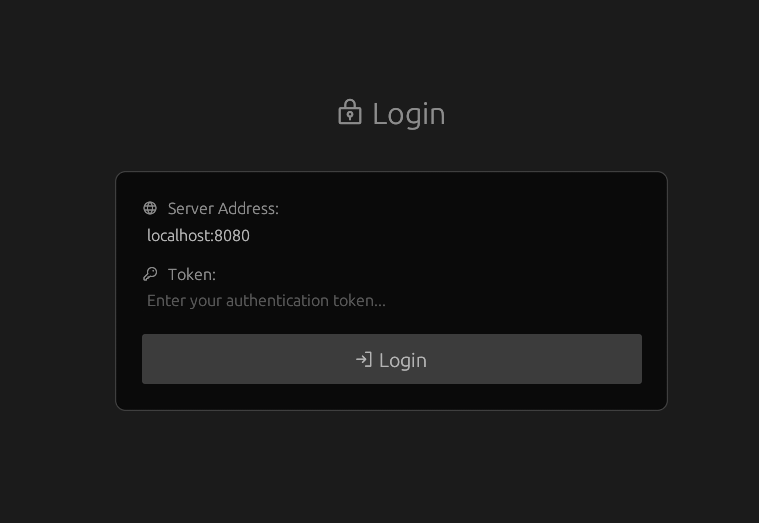
Looking at the source code, we can see some comments in Russian, referring to copying static files for a noVNC web-based + VNC viewer setup, as well as Weyhro C2 in title.
Yara Rule
Yara-Rules/WeyhroC2/win_mal_weyhroc2.yar at main · RussianPanda95/Yara-Rules
Indicators of Compromise
Payloads:
ec4ab4e4d700c9e5fdda59eb879a2bf18d0eefd825539d64677144d43a744cee
357e649b3b03ffe0d083092c0ed870c5185d64f14f5735ae43a8343269488dc3
8838278fff9a80d027951999d9f7c811ec2928afc39367f42f48f4411d1416b9
C2: 46.37.123[.]214



Start the conversation